Designing Your Dream Day: A Guide to the Wedding Powerpoint Presentation
Crafting the visual narrative for a wedding, whether it is your own or for a client, is a deeply personal process. It involves capturing a specific mood, a feeling, and a story. While many tools exist for creating save-the-dates or photo albums, the presentation itself often gets overlooked. This is where the Wedding Powerpoint Presentation from Sky Creation steps in, offering a cohesive and elegant framework to display everything from timelines and photo slideshows to seating charts and venue highlights.
The Visual Personality: More Than Just Slides
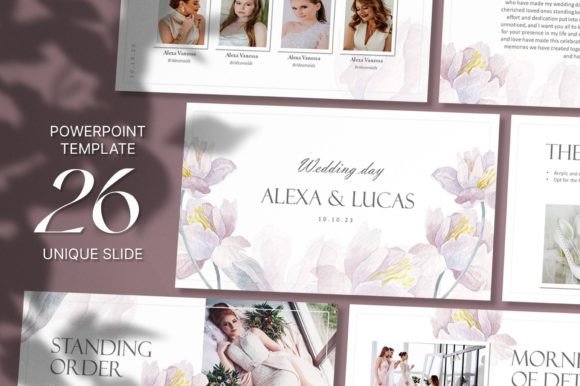
At its core, this template is a design asset that prioritizes sophistication and clarity. It avoids the cluttered, over-decorated aesthetic that can make presentations feel dated. Instead, it leans into a modern typography sensibility, pairing clean sans serif fonts for body text with graceful script or serif fonts for headings. This creates a natural visual hierarchy, guiding the viewer's eye from the most important titles to the supporting details without confusion. The overall appeal is one of understated luxury—think soft, neutral color palettes, ample white space, and thoughtful layout structures that let your content breathe.
The personality of this presentation is romantic yet professional. It doesn’t scream for attention with flashy animations. Instead, it earns attention through refined composition. This makes it an excellent choice for more than just the wedding day itself. It functions beautifully as a brand identity presentation for a wedding planner, a portfolio showcase for a photographer, or a styled mood board for a florist. The 16:9 aspect ratio and resizable graphics mean it feels contemporary and translates well to modern screens, whether projected in a ballroom or viewed on a laptop during a planning session.
Practical Applications Across Creative Projects
Understanding where a premium font or template system works best is key to getting value from it. The strength of the Wedding Powerpoint Presentation lies in its versatility within the events and creative industries. For a couple, it’s the perfect tool to create a unified look for their engagement party slideshow, rehearsal dinner overview, or even a post-wedding thank-you presentation for their wedding party.
For professionals, the applications expand significantly:
- Client Pitches: Wedding planners can use it to present venue options, vendor portfolios, and day-of timelines to prospective clients, elevating their professionalism and perceived value.
- Marketing & Social Media: The slide designs can be repurposed. A single beautifully designed slide can become an Instagram graphic or a Pinterest pin, maintaining brand consistency across platforms. This is crucial for content creators and bloggers in the wedding niche.
- Digital & Print Hybrids: While it’s a digital file, the design principles apply to print. You can export individual slides as high-resolution images for use in packaging design for wedding favors or as part of a printed lookbook.
It’s not just about the wedding day. This tool is for the entire journey surrounding it, from initial concept to final celebration, providing a consistent design asset that ties all visual communications together.
Making It Work for You: A Practical Guide
Simply purchasing a template is only the first step. The real work—and the real magic—happens in the customization. Here’s how to approach it like a pro.
Evaluate the Fit: Before you dive into editing, spend time with the 26 unique slides. Does the overall style match the wedding’s theme? A rustic barn wedding might need more texture than this sleek template offers, but a modern downtown loft wedding would be a perfect match. Look at the layout structures. Are they suited to the content you need to present? If you need a complex family tree diagram, ensure the slide master can accommodate it.
Test Your Font Pairings: The template comes with its own typeface system, but the instructions note you can install the provided fonts and edit text colors. This is your chance to experiment. The included fonts are a starting point. If the script font feels too formal, you might pair the existing sans serif with a more relaxed handwritten font from your own library for a personal touch. Always check readability. A beautiful script font is useless if guests can’t read the timeline on a projected slide from the back of the room.
Customize with Purpose: The ability to add your own photos and logo is where you inject true personality. Don’t just dump images in. Use the template’s frames as a guide for cropping and composition. When changing background colors, consider the emotional impact. Soft blues and greens evoke calm, while blush pinks and mauves feel traditionally romantic. For a small business owner like a stationer, using this template to showcase your work means your logo should be subtle but present, reinforcing your brand identity without distracting from the content.
Respect the Terms: It’s vital to remember that this is for personal use. You cannot resell the template itself or redistribute it. However, you can absolutely use it to create a presentation for a paying client. You are selling your design service, not the template file. This distinction is key for entrepreneurs and freelancers.
The true value of a tool like the Wedding Powerpoint Presentation is in how it streamlines a complex task. It provides a professional, beautiful starting point, freeing you up to focus on the storytelling, the content, and the personal details that make each wedding unique. By approaching the editing process with intentionality and an eye for detail, you transform a set of slides into a powerful communication piece that engages your audience and sets the perfect tone for the celebration to come.